Install the Moody's Maxsight for Salesforce package
Learn how to install the Moody's Maxsight managed package from AppExchange and verify installation in Salesforce.
Learn how to install the Moody's Maxsight managed package from AppExchange and verify installation in Salesforce.
Prerequisites
You must have Salesforce Administrator access.
To install the package:
Get the package.
If you are already logged in:
From the Salesforce Home tab, navigate to > > .
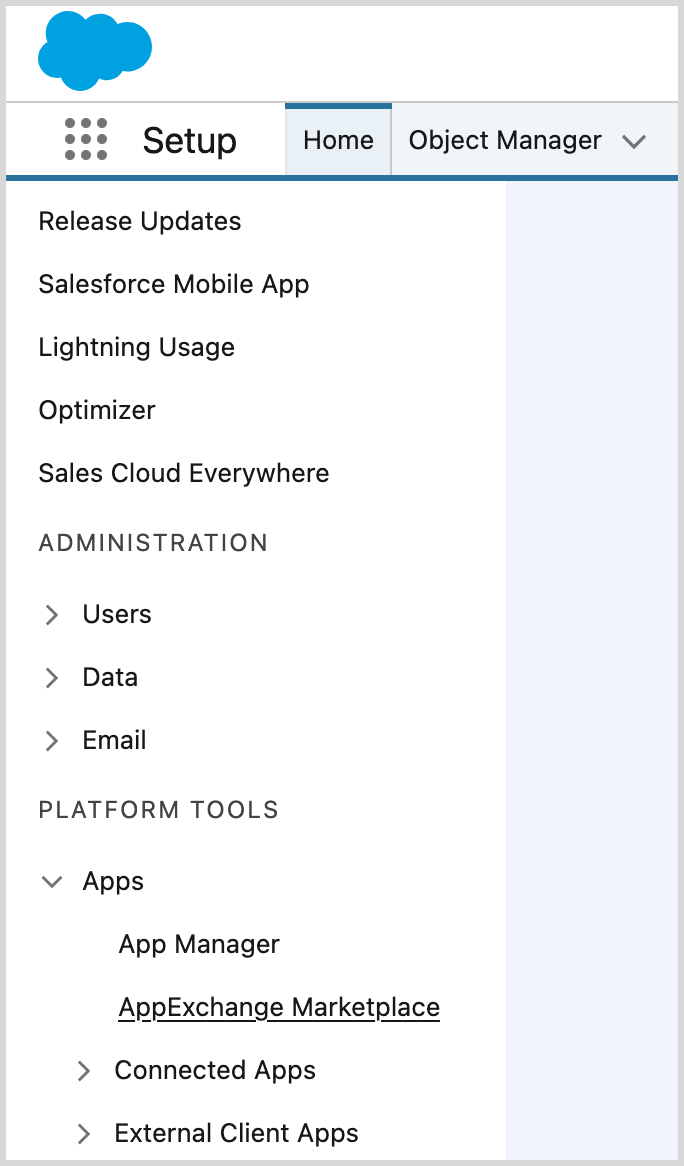
Select , then search for Moody's Maxsight.
Select the Moody's Maxsight for Salesforce.
If you are not logged in:
Use the following link to download the managed package:
Select .
Log in, if required, and follow the on-screen instructions in Salesforce until the Downloads page opens.
Make sure is selected.
Select . A confirmation email is sent when the install is complete.
Select from the Installation Complete! page. Salesforce automatically navigates to the Installed Packages page.
Alternatively, navigate to > .
Make sure that you see the package in your list of Installed Packages.